Web Usage

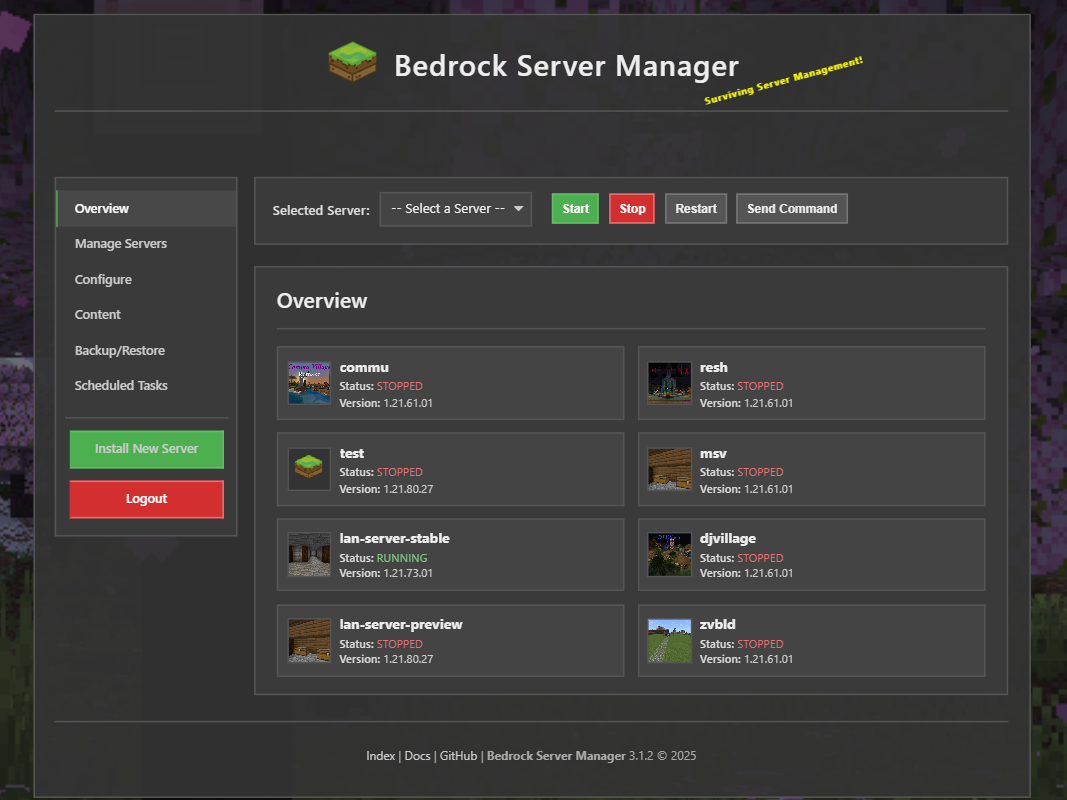
Bedrock Server Manager 3.1.0 includes a Web server you can run to easily manage your bedrock servers in your web browser, and is also mobile friendly!
The web ui has full parity with the CLI. With the web server you can:
Install New Server
Configure various server config files such as allowlist and permissions
Start/Stop/Restart Bedrock server
Update/Delete Bedrock server
Monitor resource usage
Schedule cron/task
Install world/addons
Backup and Restore all or individual files/worlds
Configure the Web Server:
Environment Variables:
To get started using the web server you must first set these environment variables:
BEDROCK_SERVER_MANAGER_USERNAME: Required. Plain text username for web UI and API login. The web server will not start if this is not set
BEDROCK_SERVER_MANAGER_PASSWORD: Required. Hashed password for web UI and API login. Use the generate-password utility. The web server will not start if this is not set
BEDROCK_SERVER_MANAGER_SECRET: Recommended. A long, random, secret string. If not set, a temporary key is generated, and web UI sessions will not persist across restarts, and will require reauthentication.
BEDROCK_SERVER_MANAGER_TOKEN: Recommended. A long, random, secret string (different from _SECRET). If not set, a temporary key is generated, and JWT tokens used for API authentication will become invalid across restarts. JWT tokens expire every 4 weeks by default
Follow your platform’s documentation for setting Environment Variables
Generate Password Hash:
For the web server to start you must first set the BEDROCK_SERVER_MANAGER_PASSWORD environment variable
This must be set to the password hash and NOT the plain text password
Use the following command to generate a password:
bedrock-server-manager generate-password
Follow the on-screen prompt to hash your password
Hosts:
Note
As of BSM 3.5.0, the web server will only accept one host at a time, if multiple hosts are specified, the first one will be used.
By Default Bedrock Server Manager will only listen to local host only interfaces 127.0.0.1
To change which host to listen to start the web server with the specified host
Example: specify local host only ipv4:
bedrock-server-manager web start --host 127.0.0.1
Example: specify all ipv4:
bedrock-server-manager web start --host 0.0.0.0
Port:
By default Bedrock Server Manager will use port 11325. This can be change in script_config.json
HTTP API:
Note
As of BSM 3.5.0, the HTTP API docs are now integrated in the web server using FastAPIs Swagger UI.
Visit: http(s)://<bsm_host:port>/docs after starting the web server.
An HTTP API is provided allowing tools like curl or Invoke-RestMethod to interact with server.
Before using the API, ensure the following environment variables are set on the system running the app:
BEDROCK_SERVER_MANAGER_TOKEN: REQUIRED for token persistence across server restartsBEDROCK_SERVER_MANAGER_USERNAME: The username for API login.BEDROCK_SERVER_MANAGER_PASSWORD: The hashed password for API login
Obtaining a JWT token:
The API endpoints require authentication using a JSON Web Token (JWT).
How: Obtain a token by sending a POST request to the /api/login endpoint.
Request Body: Include a JSON payload with username and password keys, matching the values set in the environment variables.
{
    "username": "username",
    "password": "password"
}
Response: On success, the API returns a JSON object containing the access_token:
{
    "access_token": "eyJhbGciOiJIUzI1NiIsInR5cCI6IkpXVCJ9..."
}
Tokens expiration is configurable via script_config.json (default: 4 weeks).
curl Example (Bash):
curl -X POST -H "Content-Type: application/json" \
     -d '{"username": "your_username", "password": "your_password"}' \
     http://<your-manager-host>:<port>/api/login
PowerShell Example:
$body = @{ username = 'your_username'; password = 'your_password' } | ConvertTo-Json
Invoke-RestMethod -Method Post -Uri "http://<your-manager-host>:<port>/api/login" -Body $body -ContentType 'application/json'
Using the API
Endpoints requiring authentication will need the obtained access_token included in the Authorization header of your requests:
"Authorization: Bearer YOUR_JWT_TOKEN"
For requests sending data (like POST or PUT), set the Content-Type header to application/json.
Examples:
Start server:
curl Example (Bash):
curl -X POST -H "Authorization: Bearer YOUR_JWT_TOKEN" \
     http://<your-manager-host>:<port>/api/server/<server_name>/stop
PowerShell Example:
$headers = @{ Authorization = 'Bearer YOUR_JWT_TOKEN' }
Invoke-RestMethod -Method Post -Uri "http://<your-manager-host>:<port>/api/server/<server_name>/stop" -Headers $headers
Send Command:
curl Example (Bash):
curl -X POST -H "Authorization: Bearer YOUR_JWT_TOKEN" -H "Content-Type: application/json" \
     -d '{"command": "say Hello from API!"}' \
     http://<your-manager-host>:<port>/api/server/<server_name>/send_command
PowerShell Example:
$headers = @{ Authorization = 'Bearer YOUR_JWT_TOKEN'; 'Content-Type' = 'application/json' }
$body = @{ command = 'say Hello from API!' } | ConvertTo-Json
Invoke-RestMethod -Method Post -Uri "http://<your-manager-host>:<port>/api/server/<server_name>/send_command" -Headers $headers -Body $body