Web Usage

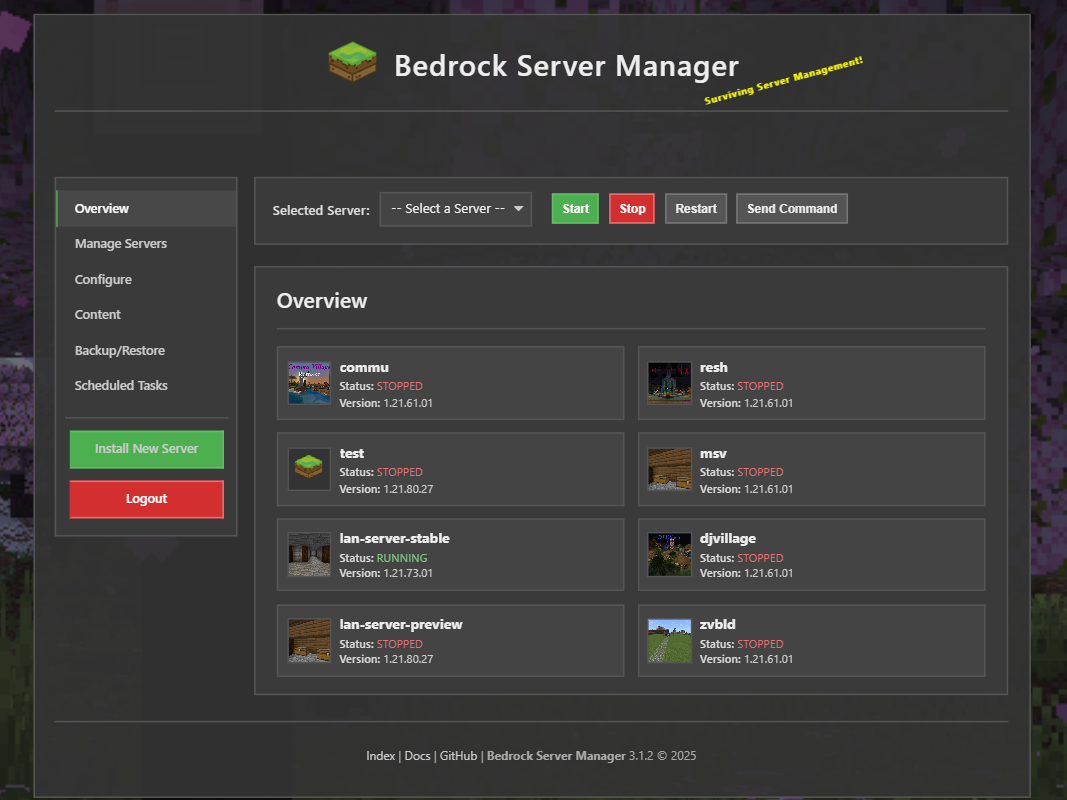
Bedrock Server Manager includes a Web server you can run to easily manage your bedrock servers in your web browser, and is also mobile friendly!
With the web server you can:
Install New Server
Configure various server config files such as allowlist and permissions
Start/Stop/Restart Bedrock server
Update/Delete Bedrock server
Monitor resource usage
Install world/addons
Backup and Restore all or individual files/worlds
Manage Plugins
Hosts:
By Default Bedrock Server Manager will only listen to local host only interfaces 127.0.0.1
To change which host to listen to start the web server with the specified host
Example: specify local host only ipv4:
bedrock-server-manager web start --host 127.0.0.1
Example: specify all ipv4:
bedrock-server-manager web start --host 0.0.0.0
You can also change the host by running the setup command, which will prompt you for the host to use.
bedrock-server-manager setup
Port:
By default Bedrock Server Manager will use port 11325. This can be change with the setup command.
HTTP API:
An HTTP API is provided allowing tools like curl or Invoke-RestMethod to interact with server.
Obtaining a JWT token:
Note
The API relies on Bearer tokens for authentication using the Authorization header.
The API endpoints require authentication using a JSON Web Token (JWT).
How: Obtain a token by sending a POST request to the /auth/token endpoint.
Request Body: Include form data (application/x-www-form-urlencoded) with username, password, and an optional remember_me key (default is false). Setting remember_me to true extends the token expiration.
Response: On success, the API returns a JSON object containing the access_token:
{
    "access_token": "eyJhbGciOiJIUzI1NiIsInR5cCI6IkpXVCJ9...",
    "token_type": "bearer",
    "message": "Successfully authenticated."
}
Tokens expiration is configurable via web ui (default: 4 weeks).
curl Example (Bash):
Extract the token from the response. You can use tools like jq to parse the JSON output.
curl -X POST -H "Content-Type: application/x-www-form-urlencoded" \
     -d "username=your_username&password=your_password&remember_me=true" \
     http://<your-manager-host>:<port>/auth/token
PowerShell Example:
Store the authentication token in a variable.
$body = @{ username = 'your_username'; password = 'your_password'; remember_me = $true }
$response = Invoke-RestMethod -Method Post -Uri "http://<your-manager-host>:<port>/auth/token" -Body $body -ContentType 'application/x-www-form-urlencoded'
$token = $response.access_token
Using the API
Endpoints requiring authentication will need the obtained access_token included in the Authorization header as a Bearer token.
For requests sending data (like POST or PUT), set the Content-Type header to application/json.
Examples:
Start/Stop server:
curl Example (Bash):
Using -H "Authorization: Bearer <token>" to pass the token.
curl -X POST -H "Authorization: Bearer <YOUR_ACCESS_TOKEN>" \
     http://<your-manager-host>:<port>/api/server/<server_name>/stop
PowerShell Example:
Using the previously saved authentication token in the Headers.
$headers = @{ 'Authorization' = "Bearer $token" }
Invoke-RestMethod -Method Post -Uri "http://<your-manager-host>:<port>/api/server/<server_name>/stop" -Headers $headers
Send Command:
curl Example (Bash):
curl -X POST -H "Content-Type: application/json" -H "Authorization: Bearer <YOUR_ACCESS_TOKEN>" \
     -d '{"command": "say Hello from API!"}' \
     http://<your-manager-host>:<port>/api/server/<server_name>/send_command
PowerShell Example:
$headers = @{ 'Content-Type' = 'application/json'; 'Authorization' = "Bearer $token" }
$body = @{ command = 'say Hello from API!' } | ConvertTo-Json
Invoke-RestMethod -Method Post -Uri "http://<your-manager-host>:<port>/api/server/<server_name>/send_command" -Headers $headers -Body $body